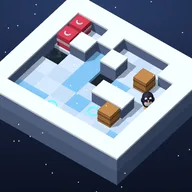
Frostpush is a free block-pushing puzzle that runs in the browser. It is built with Three.js, the JavaScript library for 3D graphics on the web, and drawn in an isometric style so every level looks like a small diorama. This post walks through how it is put together: the camera, the split between rules and rendering, the solver that checks every level, and a few problems we hit along the way. It is written for developers, but you do not need to know Three.js to follow the ideas.
Why Three.js for an isometric game
Isometric games are often drawn with 2D sprites, where each tile is a pre-drawn diamond. That works well, but every object needs art drawn from the exact angle you chose. With a real 3D scene and an orthographic camera, you get the isometric look for free. Boxes are boxes, lighting and shadows are calculated, and changing the angle is one line of code.
Three.js gives us the renderer, simple shapes, lights and shadow maps. Everything in Frostpush is built from basic geometry, boxes, spheres, capsules, a cone and a torus, so the game ships with no model or texture files at all. Even the sound effects are generated in code with the Web Audio API.
The camera: orthographic, not perspective
A normal 3D camera uses perspective, so things further away look smaller. Isometric art has no perspective, so we use an OrthographicCamera, which keeps sizes the same at any distance.
The camera sits above and to one side of the board, looking down at the centre. A true isometric view puts the camera at exactly 45 degrees around the board. We turned it to 38 degrees instead, and the reason is the controls. At exactly 45 degrees, the board’s grid lines run along perfect screen diagonals, so the Up arrow sits exactly halfway between two directions and either could be meant. A few degrees off and each arrow key has one clear closest direction.
Fitting the board to the screen took more care than expected. Levels have different sizes, and the window can be a wide laptop screen or a tall phone. Our approach:
- Place the camera, then take the eight corners of the level’s bounding box.
- Transform each corner into camera space, which tells us where it lands on screen.
- Take the smallest and largest x and y values, add room for the top bar and the touch controls, and set the camera’s left, right, top and bottom edges from them.
Because it measures the real projected shape, the board fills the space well at any size, and it runs again whenever the window is resized.
Rules and rendering are kept apart
The most useful decision was keeping the game rules completely separate from Three.js. The rules live in a small module of pure functions. Given a level and a game state, move() returns either nothing, if the move is not allowed, or a new state plus a list of events describing what happened: the player walked, a crate was pushed along a path, a crate fell into a hole, a magnet crate was pulled.
The renderer never decides anything. It takes those events and animates them: it slides the penguin along the walk path, moves the crate meshes, drops a crate into a hole and swaps in a filled floor tile. Undo is just a stack of previous states. To undo, we pop a state and snap every mesh to where that state says it should be.
Each crate carries a stable id from the moment the level loads. An earlier version referred to crates by their position in the list, which broke when one move both filled a hole (removing a crate from the list) and pulled a magnet crate (whose position had shifted). Ids made every event point at the right mesh.
A solver checks every level
Because the rules are pure functions with no graphics attached, they run just as well in Node.js. That let us write a breadth-first search solver in a few dozen lines. It tries every move from the start position, then every move from those positions, and so on, skipping any state it has already seen, until it finds a state where every ring is covered.
Breadth-first search finds the shortest solution first, which is exactly what we wanted for par, the move count needed for three stars. A verification script solves every level and fails if any level has no solution or if its par does not match the solver. It is impossible to ship a level that cannot be finished.
The same solver helped design the levels. A small generator builds random rooms with walls, crates, rings and, depending on the set, ice, holes or magnet crates. It solves each one and keeps only rooms whose solution falls in a target length and actually uses the new rule, for example at least one crate filling a hole. Rooms where the solver had to search many positions per move of the solution were treated as harder. We picked the final 20 by hand from those candidates and wrote a hand-made first level as a tutorial.
Input that matches what you see
On an isometric board, “up” on the screen is not the same as “up” on the grid. Instead of hard-coding which key means which grid direction, the game projects each grid direction onto the screen and picks the one closest to what the player pressed or swiped. The same function powers the arrow keys, swipes and the on-screen pad, and it sets the angle of the pad’s arrows so they point along the board’s diagonals.
We hit one bug here worth sharing. The projection happens in normalised device coordinates, where the screen runs from minus one to one on both axes whatever its shape. On a wide screen that is close enough, but on a tall phone it distorts every angle, and two pad buttons ended up on top of each other. Scaling the projected vector by the canvas width and height before comparing directions fixed it.
Input is also queued. Moves animate over roughly a tenth of a second, and fast players press keys quicker than that. The first version kept only one waiting move and silently dropped the rest. Now up to six moves wait in line, and the queue clears when a move is blocked so a burst of presses cannot carry you somewhere unexpected.
Testing the real game, not just the rules
The solver proves each level can be solved, but not that the game in the browser behaves the same as the rules module. So we also ran every level’s solution through the real game in a headless browser, pressing the actual keys, and checked that the level-cleared screen appeared. All 20 passed, which covers ice, holes and magnets end to end.
Shipping it on the website
The game source is plain JavaScript modules, bundled and minified with esbuild into one file of about 570 KB, or roughly 140 KB compressed. Most of that is Three.js itself.
On the game’s page, the game does not load until someone presses Play. Until then the page shows a static picture, which keeps the page fast for visitors and for search engines. Pressing Play inserts an iframe with the game. Game events such as a level being completed are sent from the iframe to the page with postMessage, and the page forwards them to analytics, so the game itself never touches cookies or consent settings. Progress is saved in the browser’s local storage, wrapped so a blocked or private-mode storage never crashes the game.
What we would tell someone starting out
- Keep rules and rendering separate from day one. It gives you undo, testing and a solver almost for free.
- Use an orthographic camera for isometric games, and nudge the angle away from exactly 45 degrees if you use keyboard controls.
- Fit the camera to the projected shape of the level, not to its width and height.
- Test your controls on a tall phone screen early. Aspect ratio bugs hide on desktop.
You can see the result by playing Frostpush, and our Frostpush guide covers the game from a player’s side.